


Air-Travel
Experience


UX Research + Product Design


Problem Space
In 2025, 853 Million People Traveled by Air in the United States.
-Statista Research Department

Due to the high number of travelers yearly, there is a the need for a smooth and stress-free travel experience. Travelers often face challenges such as:

My focus is to enhance the travel experience by designing a travel assistant app that:
1
Uses predictive tools to improve travel planning.
2
Provides personalized travel solutions tailored to individual travel needs.
Project Plan
Research Approch
To have a organized and well-structured project, I decided to start with a Double Diamond Method to help organize my milestones.
.jpg)
Project Goals
Gain a solid knowledge base on the existing opportunities and challenges of the airport experience.
Discover a feasible and effective way to design for the user's main airplane travel pain points.
Boost travelers confidence by designing an app to minimize travel stressors through personalized recommendations, real-time updates, and streamlined trip management.
Milestone 1
Research & Discovery
Guiding Question
What are the current airport systems, and how do travelers interact with them? How can I address the specific needs and pain points travelers face throughout their journey?
To start off the project, I wanted to better understand how current travel and transportation systems function today and how emerging technologies, including AI, could improve the overall travel experience. I also wanted to gain firsthand insights on travelers’ experiences, challenges, and needs while traveling.
Research Approach

15+
Literatures Reviewed
- Travel Trends
- Aviation Operations
- AI & Machine Learning
- Transportation
10
Users Interviewed
- 6 Leisure Travelers
- 3 Business Travelers
- Mixture of Ages
- 30-minute Sessions


Research Insight
Air travelers want to get through the airports as easily as possible and want to easily get updates on their fingerprints with smartphones.
I found that airport travelers prioritize accurate, real-time information delivered through mobile devices. Research shows that passengers heavily rely on smartphones for flight updates, navigation, and managing travel-related tasks, which helps reduce stress. Based on this, I prioritized a mobile-first approach in my prototype, ensuring walking times, TSA wait times, and terminal maps were easy to access on a phone.

Research Insight
Despite technological advancements, airports still face challenges meeting passenger expectations, particularly regarding long wait times and inefficient navigation systems.
I found that unpredictable wait times and unclear airport navigation are major stressors for travelers, especially infrequent flyers. Longer-than-expected lines can make passengers feel rushed and anxious, increasing the risk of missed flights. This reinforced my decision to include live TSA wait times in the app, helping make the travel experience feel more predictable and manageable.
.png)
“Yavuz stated in this regard that queueing times are critical for achieving overall passenger satisfaction. Moreover, queuing time is found to be one of the most influential factors on satisfaction”
-Bakır, M. et al, 2022
Research Insight
Lack of Personalization in Airports, can make users feel disoriented and frustrated.
I found that without tailored experiences, travelers struggle to quickly find relevant flight information among overcrowded screens. Different traveler types, such as business and leisure travelers, have different needs, which can lead to inefficiency and frustration. This highlighted the importance of customizable, user-specific information in my design to improve satisfaction and streamline the travel experience.
.png)
"Passengers want to be in greater control of their journey and it is essential to find more ways to interact with them through smartphones and other means, allow for greater customisation, and be able to adapt to what they want."
-Rostworowski, 2012
Developing the Intelligent Airport
Defining the User
To focus on a specific user, I wanted to narrow the scope of the project to a specific type of traveler in order to better understand their needs, behaviors, and pain points. This helped guide more focused design decisions and create a solution tailored to their travel experience.
Primary Users

Leisure Air Travelers
Unfamiliar With Most Airports
Domestic
-
Seek stress-free travel
-
Need flexible options, simple airport navigation, clear activity and dining info, TSA wait times, and connecting flight details
Secondary Users

Business Air Traveler
Including Flight Staff
Domestic
-
Prioritize efficiency, real-time updates, lounges, and seamless connections
Milestone 2
Research Synthesis & UX Definition
Guiding Question
How do leisure travelers navigate the airport experience, and what challenges do they face?
After conducting initial research to better understand my problem space, I want to explore the pain points faced by leisure travelers and identify design solutions that enhance their travel experience.
Comparative Analysis
Conducted a comparative analyses of 7 different travel apps to evaluate existing airport-related apps, understanding their strengths and weaknesses to uncover opportunities for a more user-friendly travel experience.
Apps Compared:

Investigated Features, Location Used, Pain Points, User Reviews, Overall UI
Strengths found in other apps:
Weaknesses found in other apps:

Sketching Round 1
After conducting a comparative analysis, I started sketching a foundation for the app’s layout and features, allowing for quick iteration before conducting a Co-Design.

Co-Design
To better understand user expectations, behaviors, and preferences when navigating airports, I conducted a co-design session with three leisure travelers. By collaborating with potential users, I was able to gather insights on their key pain points and personal travel experiences.
Pain Point Prioritization
I asked a co-design group to write out 3 pain points they face when traveling. This included frustrations and feelings they face. We discussed these pain points, then ‘starred’ the top 2 issues to focus on: security & stress.

Yellow is feeling felt, orange is frustration felt during airport experince.
Brainstorming

I asked, “What one feature would a smart travel assistant need?” and the group shared and discussed ideas.
Rapid Sketching

Participants spent 2 minutes sketching their ideal app screen, then shared and refined ideas together.
_JPG.jpg)
Rapid UI Sketching CoDesign Session
Co-Design Insights

Milestone 3
Concept Development & Refinement
Guiding Question
How can I apply insights from primary and secondary research to design a user-friendly, informative app that addresses user needs and pain points?
Using the research I conducted, I want to design a solutions that create a seamless and effective experience to travelers.
Continued Sketching
I completed multiple rounds of sketching in different settings to explore variations, refine ideas, and improve usability before moving to higher-fidelity prototypes.
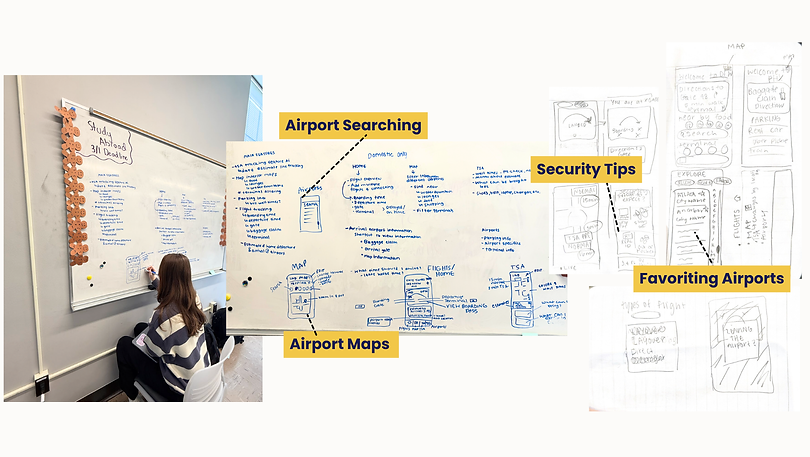
Interactive Figma Prototypes - Iteration 1 & 2
Created interactive Figma prototypes and refined prototype using user feedback to create a clearer, more intuitive, and polished app experience ready for deeper testing.
.png)
.png)
Flight: This page shows boarding, departing, and airport info such as flight status, gates, and security wait times to help travelers navigate the airport.
.png)
.png)
Map: Users can use interactive map to search airport amenities, explore restaurants, terminals, and locate services for a smoother travel experience.
.png)
.png)
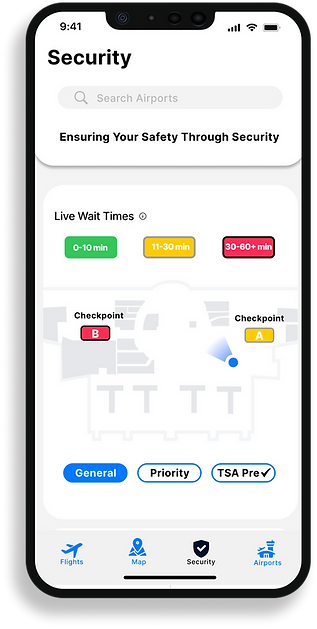
Security: Users can view different security wait times, security tips, and packing information.
.png)
.png)
Airports: Users browse airports, view maps, dining, and business levels, and filter by recent visits, distance, or favorites.
Between design iterations, I iterated by building out the foundation of the interactive prototype. Creating this base allowed me to test layouts, interactions, and visuals more effectively, making it easier to gather feedback and refine the design.
User Feedback Collected
After completing designs, I gathered user feedback and conducted testing on my interactive prototype. This process helped ensure that the prototype was intuitive, functional, and met user needs.
Conducted User Feedback on 4 Participants
Key Points:
🛩️Flights:
-
Flight info is confusing because it shows under both departure and arrival airports instead of just departure.
-
Add timestamps to airport business history for clarity.
-
The page has too much flight info and feels overwhelming.
-
Inconsistent spacing in areas.
🗺️Map:
-
Highlight where the user is on the map.
-
Make icons clearer and easier to understand.
-
It was hard to quickly find key actions, navigation buttons could be reordered based on user priorities.
-
Simplify map filtering by removing the top navigation.
🛃Airports:
-
Add a favorites icon so users can quickly access preferred airports.
-
The airports page is clear and easy to understand.
-
Use a heart icon to save favorite airports instead of placing it in the nav row.
-
Add offline access for key details like gate, terminal, and maps in case of lost connection.
Security:
-
Add more clarity on colors and checkpoint colors.
-
Add a Favorites section on the security page for quick TSA info access.
-
Users liked that important info is easy to find without clutter.
Final Designs
After revising from rounds of designing and testing, I finalized high fidelity screens.
After getting our user feedback, I created to high fidelity prototypes, refining the experience and interaction points within the designs. I added interactivity to designs, simulating the flow and experience a user would experience when engaging with Flights app.
.png)
Flights
.png)
.png)
-
Displays upcoming flight details directly on the lock screen
-
Dynamic notifications update as the boarding process changes: boarding soon, now boarding, departing, and gate numbers.
-
Flights app is an apple inspired app that would integrates seamlessly with other Apple services like calendar and maps
Flights
-
Quickly view key flight info (boarding, departure, gate, terminal) and sort or search flights.
-
Share flights with friends and see arrival details (gates/terminals are greyed out if tentative).
-
Access TSA wait-time predictions, personalized airport arrival suggestions, and info on parking, dining, and shopping.

.png)
Map
-
Explore an interactive airport map with icons for restaurants, shops, restrooms, security, and more.
-
Tap icons or filter options to get directions or view choices, making navigation easy and fast.
-
Select a security checkpoint to receive the most efficient walking route.
.png)
.png)
Security
-
View live TSA wait times by checkpoint with color-coded and accessible indicators, and filter by security entrance.
-
Access security reminders and tips on ID checks, screening, liquids, and luggage to move through security smoothly.
.png)
Flights
-
Browse airports with search, filters (distance or popularity), and the ability to favorite locations.
-
View airport details like weather, local time, live and predicted TSA wait times, plus shops, dining, and transportation options.
.png)
.png)
High-Fi Prototype Demo

WHY FLIGHTS APP?
Centralizes Info
.png)
Simplifies Navigation
.png)
Full Journey Support
